
Analytics
Smart Campaign Analytics
Read Meta delivery, attributed saves, Smart Link actions, creative, placement, demographic, country, and eligible Spotify campaign reporting.
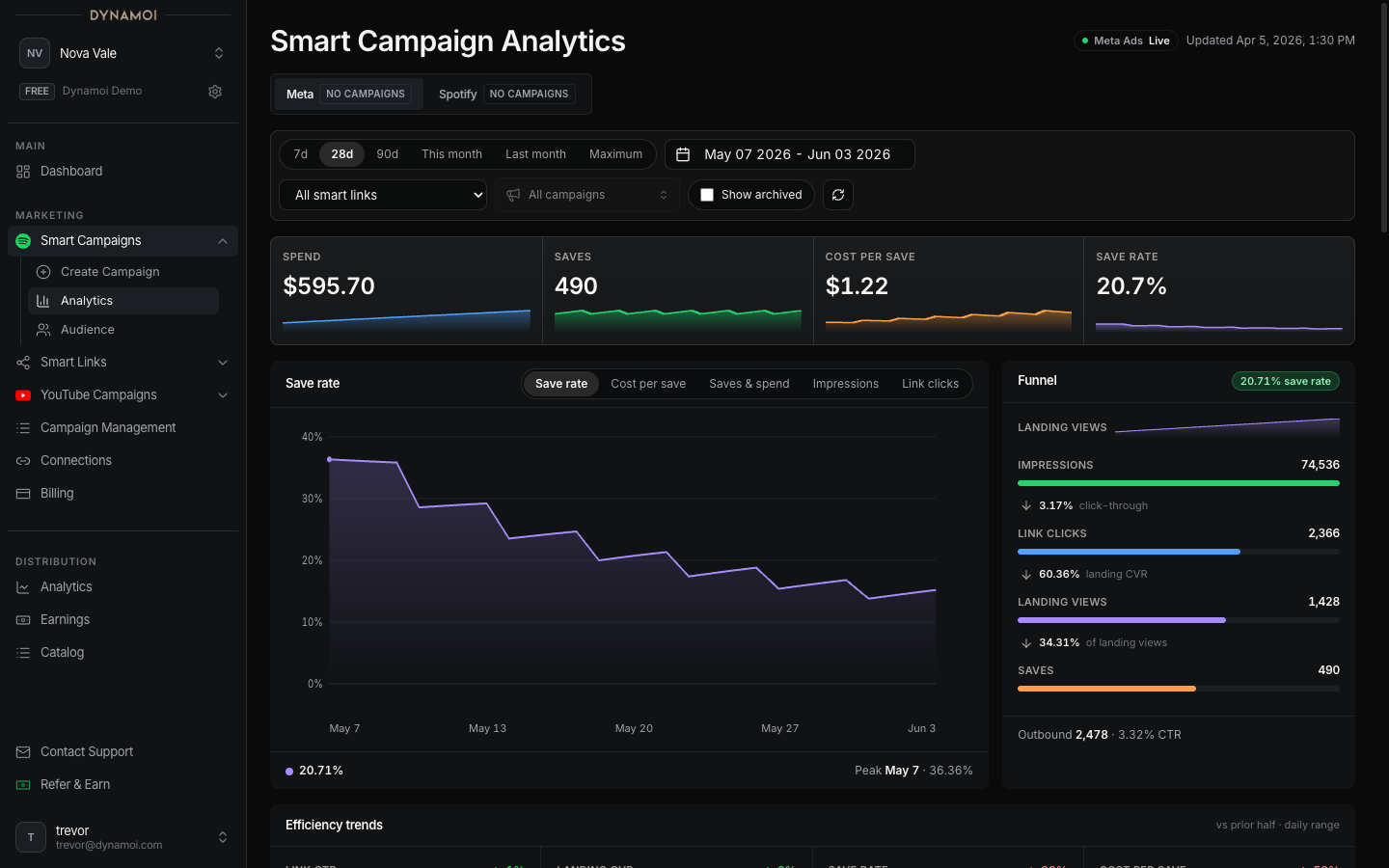
Smart Campaign Analytics combines managed Meta advertising data with available Smart Link and artist-response signals. It is designed to show both ad delivery and what happened after a person reached the campaign destination.
Scope controls
The compact filter bar can include:
- Date presets such as Last 7 Days, Last 28 Days, Last 90 Days, This Month, Last Month, and Maximum
- One or more selected Smart Campaigns
- A Smart Link filter
- A Show archived toggle
- Meta and Spotify provider tabs when eligible campaign records exist
The current Smart Campaign creator deploys through Meta. The Spotify analytics tab is a beta reporting surface for eligible existing Spotify campaign records; it does not mean Spotify Ads is available as a current self-serve delivery option.
Headline Meta metrics
| Metric | Definition |
|---|---|
| Spend | Meta-reported campaign spend for the selected scope |
| Meta-attributed saves | Save conversions attributed by the Meta campaign reporting pipeline |
| Cost per save | Spend divided by Meta-attributed saves; shown as unavailable when no save denominator exists |
| Save rate | Meta-attributed saves divided by unique link clicks |
These are reporting definitions, not proof that every save was caused exclusively by the ad. Attribution settings, provider processing, and late-arriving actions can change recent totals.
Conversion funnel
The funnel uses nested stages where possible:
- Impressions
- Unique link clicks
- Landing-page views
- Meta-attributed saves
It also shows side signals such as Meta outbound clicks, first-party music-service clicks, and Feature.fm actions when available. Those side signals are not always subsets of the save path, so Dynamoi does not force them into a misleading sequential conversion rate.
Common rates include:
- Link click-through rate: unique link clicks divided by impressions
- Landing conversion rate: landing-page views divided by unique link clicks
- Save rate: attributed saves divided by unique link clicks
- Landing-to-save rate: attributed saves divided by landing-page views
Trends and efficiency
The timeline can switch among:
- Save rate
- Cost per save
- Saves and spend
- Impressions
- Link clicks
Efficiency tiles compare the trailing half of the selected window with the preceding half for metrics such as cost per save, landing conversion rate, link click-through rate, and save rate. A missing denominator is not converted to a favorable zero; charts can show a gap instead.
Creative, placement, and engagement
When Meta returns the required breakdowns, the page can show:
- Creative-level delivery and conversion performance
- Creative resonance comparisons
- Placement-efficiency heatmaps
- Likes, comments, shares, and post saves
- Age and gender breakdowns
- Country performance
A post save is a save of the Meta post or ad. It is not a Spotify or Apple Music save.
Breakdown totals may not equal the headline total because of provider aggregation, privacy thresholds, unavailable dimensions, or rows outside the selected breakdown.
Smart Link and market response
First-party or Feature.fm panels can show:
- Smart Link page and service activity by link
- Music-service mix
- Countries associated with observed campaign or landing activity
- Spotify artist response, listener movement, playlist reach, and market-efficiency context
Country signals from Meta delivery, Smart Link activity, and Spotify market observations have different attribution boundaries. Read the source note on the card rather than treating every country row as the same population.
Spotify beta reporting
The Spotify tab can show campaign status, spend, impressions, reach, clicks, frequency, completion or lead fields, and reporting state for eligible linked campaigns. Small values may be privacy-suppressed, and the selected report range can be out of sync with the last imported provider report.
Possible states include waiting for a first report, range mismatch, not deployed, deployment issue, synced, or unavailable. Meta reporting remains separate when Spotify reporting cannot load.
Freshness and troubleshooting
Before interpreting a change:
- Confirm the selected campaigns, Smart Link, archived toggle, and date range.
- Check the data-status pill and observed-at time.
- Allow Meta attribution and Smart Link events to settle.
- Distinguish zero from unavailable or incomplete.
- Compare enough spend and conversion volume to avoid reacting to one action.
See Campaign Optimization for decision guidance and Smart Link Analytics & Settings for link-specific reporting.