
YouTube Campaigns
YouTube Campaign Overview
Understand Dynamoi-managed YouTube advertising, current campaign strategies, prerequisites, budgets, controls, and reporting.
YouTube Campaigns are managed Google Ads campaigns for videos on an artist's connected YouTube channel. Dynamoi owns and operates the advertising account, while the artist dashboard provides campaign setup, lifecycle controls, and reporting when the required provider data is available.
Note You do not need your own Google Ads account. You do need to connect the artist's YouTube channel and accept Dynamoi's Google Ads link from YouTube Studio.
What YouTube Campaigns can do
A YouTube Campaign can:
- Promote videos from the connected artist channel through Google Ads
- Target worldwide delivery or selected countries
- Optimize toward views, continued organic viewing, subscribers, or revenue signals, depending on the selected strategy
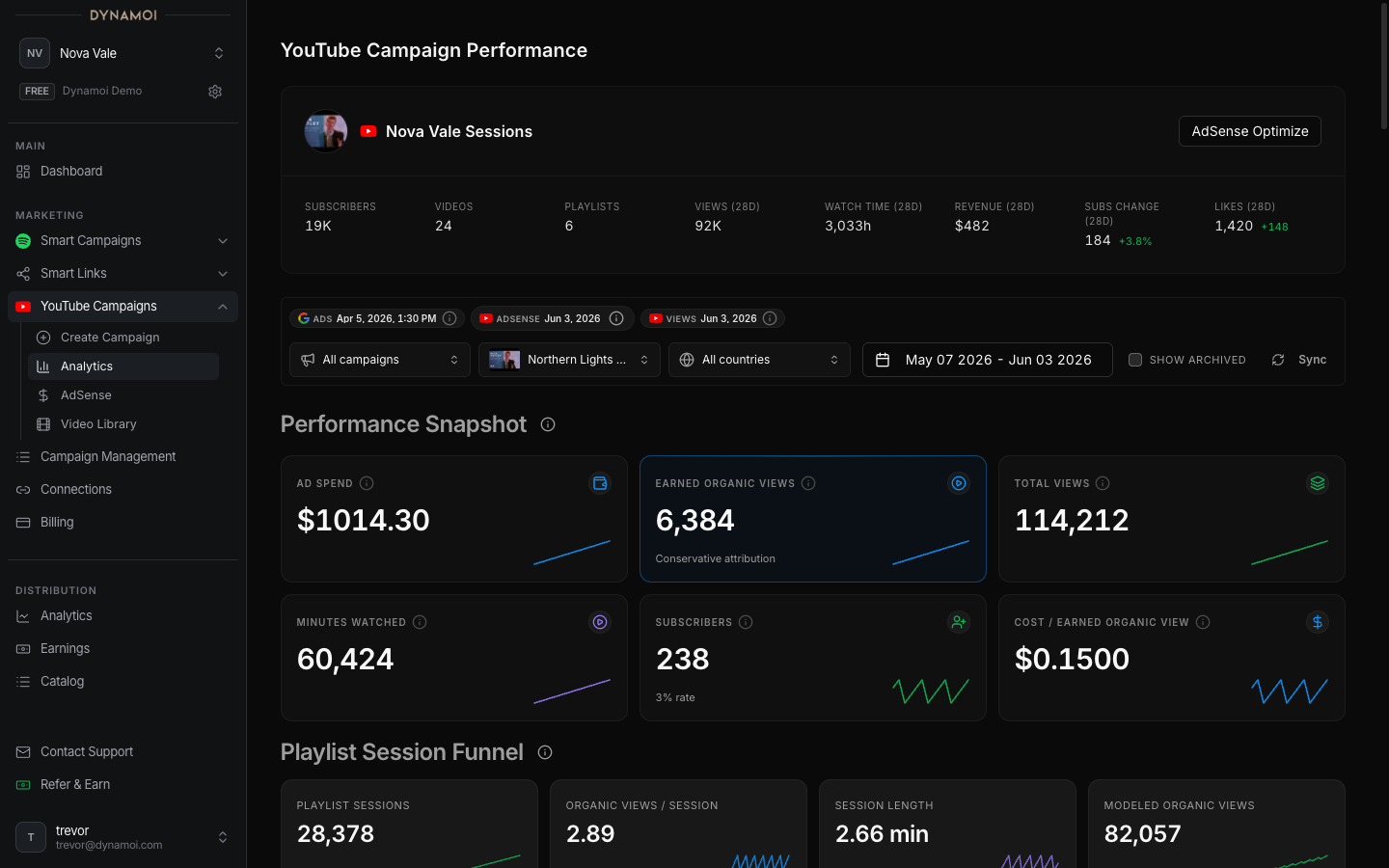
- Report advertising delivery together with eligible YouTube channel outcomes
- Show AdSense and return-multiple estimates when the channel is monetized and revenue data is available
Advertising can increase exposure, but Dynamoi does not guarantee views, subscribers, watch time, monetization eligibility, revenue, or organic lift.
Current strategies
| Strategy | Current behavior | Content requirement |
|---|---|---|
| Maximize Views | Uses a broad Google Video campaign to seek lower-cost views | One video; no playlist required |
| Organic Views | Uses in-feed inventory and optimizes for viewers who continue watching the channel after the ad | A playlist destination is required |
| Subscriber Growth | Uses in-feed inventory and optimizes for viewers likely to subscribe | A playlist destination is required |
| Organic Views & Subscribers | Balances continued viewing and subscriber signals | A playlist destination is required |
| Revenue Optimization | Uses in-feed and Discover inventory and optimizes with eligible AdSense revenue signals | Monetized channel and playlist destination required |
Dynamoi recommends Revenue Optimization when the connected channel is monetized. Otherwise, the default recommendation is Organic Views & Subscribers. You can choose another strategy when it is available for the channel.
Videos and playlists
Playlist-based strategies can include up to 10 promoted video-and-playlist destinations in one campaign. The first selection is the primary destination and its playlist title names the campaign; you can make another selection primary before launch.
Maximize Views is different: it accepts one video without a playlist and runs as a fixed-flight Google Video campaign.
See YouTube Video Library for the connected-channel catalog and Creating a YouTube Campaign for the complete setup flow.
Requirements
Before launch, verify:
| Requirement | Where to check |
|---|---|
| YouTube channel connected | Account → Platform Connections |
| Google Ads link accepted | YouTube Studio permissions or linked-account settings |
| Managed advertising active | Account → Billing |
| Eligible channel content | YouTube Video Library or the campaign creator |
| Playlist destination | Required for every strategy except Maximize Views |
The selected videos must belong to the connected channel. Dynamoi also screens campaign content before deployment; provider policy review can still occur after submission.
Budgets and duration
Current YouTube limits are:
- Daily budget: $10 to $100 per day
- Total budget: at least $75
- Minimum duration: 5 full Google Ads account days
- Total-budget pacing: the total must also support at least $10 per campaign day
Maximize Views always uses a total budget. Other strategies can use daily or total budgets.
Managed-advertising plan credit is applied before additional eligible usage is billed. See Subscriptions & Pricing and Credits & Spending.
Campaign controls
Open All Campaigns to review a campaign's current status and available actions.
- Active mutable campaigns can generally be paused.
- Paused mutable campaigns can generally be resumed when billing and provider state allow it.
- Budget, end-date, country, optimization-goal, and monetization-mode edits depend on campaign type, status, budget type, and provider support.
- Maximize Views is a fixed-flight campaign. Pause requests are processed asynchronously through the Google Ads Script delivery queue; self-serve resume is currently blocked until the remote runner can re-check billing authority at execution time. Budget, targeting, end date, and optimization settings remain locked.
- Shop-linked YouTube campaigns are analytics-only in the dashboard.
See Managing Campaigns and Editing Live Campaigns for the shared lifecycle rules.
Reporting
YouTube Analytics can include, when available:
- Google Ads impressions, cost, views, view rate, and cost per view
- Converted or earned-view signals reported by Google Ads
- Channel views, subscribers, watch time, and country performance
- Discovery and playlist behavior
- Video-level comparisons and creative-quality signals
- Revenue, RPM, and return multiples for monetized channels
- Data-status and freshness notices for incomplete or delayed sources
Provider reporting is not instantaneous. Google Ads, YouTube Analytics, and AdSense can settle on different schedules, so recent dates may be incomplete and some panels appear only when the required data exists.