
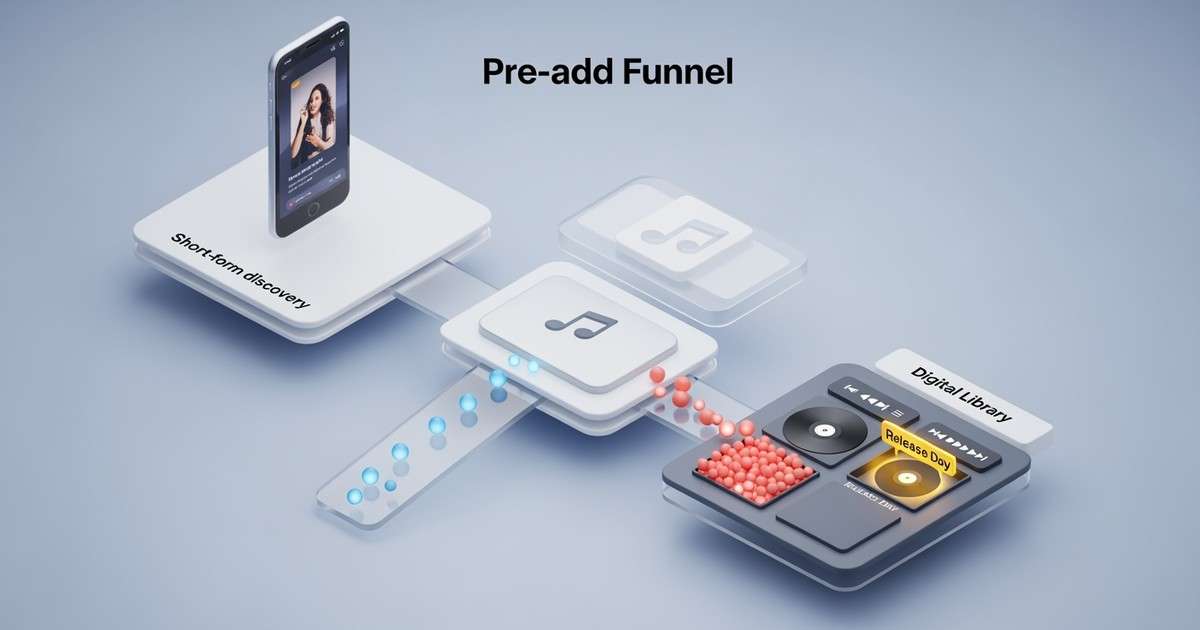
Apple calls them pre‑adds. The job is the same as a pre‑save: capture intent before release day, then convert that intent into day‑one listening.
The mistake is treating pre‑adds as a link.
Pre‑adds are a funnel step. They work when you pair them with a clear narrative and a next action.
What a Pre‑Add Actually Does
When a listener pre-adds, your release is queued for their library. On release day, the album or single automatically appears, no extra action required from the listener.
How it works under the hood. Apple Music pre‑adds are built on the iTunes Store's pre‑order architecture. The Store has supported pre‑orders since 2008, and pre‑adds inherit that infrastructure. When a user taps "Pre‑Add," Apple records the intent and schedules automatic fulfillment at the release timestamp (typically midnight in each timezone).
Instant Gratification tracks. If your release includes multiple tracks and you designate some as "Instant Gratification" (IG) tracks, those become available immediately upon pre-add. This gives fans early content and creates an opportunity for promotional momentum before the full release. Not all distributors support IGs; check with yours.
How Pre‑Adds Differ from Spotify Pre‑Saves
| Feature | Apple Music Pre‑Add | Spotify Pre‑Save |
|---|---|---|
| Library behavior | Added to Library automatically | Saved to Library |
| Instant content | Instant Gratification tracks possible | No early access |
| Playlist add | Optional (can add to playlist) | Optional |
| OAuth requirement | User must be signed in | OAuth consent flow |
| Platform base | iTunes Store pre‑order system | Spotify-native |
The key difference: Apple's pre-add uses a decade-old purchase infrastructure. Spotify's pre-save is a playlist/library action built for streaming. Neither is strictly "better"; they serve different listener bases.
Setting Up Pre‑Adds Through Your Distributor
Pre‑adds are enabled at the distributor level, not in Apple Music for Artists directly. The typical workflow:
- Schedule your release with your distributor 2‑4 weeks before drop.
- Enable pre‑add/pre‑order in the distributor's delivery settings. Most major distributors (DistroKid, TuneCore, CD Baby, AWAL, ONErpm) support this.
- Set Instant Gratification tracks if your distributor supports them and you want early singles.
- Apple processes the metadata and creates the pre‑add page within 1‑5 business days.
- Promote the pre‑add link from Apple Music for Artists or your smart link tool.
Timing matters. Apple recommends delivering releases at least 2 weeks before release date to ensure pre‑add availability. Last‑minute deliveries may not have pre‑add pages ready in time.
When Pre‑Adds Matter Most
Pre‑adds matter most when:
- your audience is already Apple‑heavy (genre and region dependent)
- you have a warm base that will actually act
- you have a plan to drive those listeners back on release day
They matter less when you only have cold traffic. Cold pre‑adds are usually expensive and low quality.
Geographic consideration. Apple Music market share is strongest in the US (~25‑32%), Japan, and among iOS users generally. If your audience skews Android or is concentrated in Latin America or Southeast Asia, Spotify pre‑saves may convert better.
The Pre‑Add Funnel That Works
- Short‑form discovery: Reels, Shorts, or creator clips that earn attention.
- Landing page: One clear CTA for Apple Music, plus a fallback for other DSPs. Do not give six equal buttons; prioritize Apple if that is your target.
- Pre‑add: Listener commits.
- Release‑day retargeting: Same hook, new angle, and a direct "go listen" ask.
If your landing page offers six equal buttons, you will convert fewer pre‑adds and make your tracking noisy.
Measuring Pre‑Add Quality
Pre‑add count alone is a vanity metric. What matters is whether those pre‑adds convert to day‑one plays.
Metrics to track:
| Metric | What It Shows | Target |
|---|---|---|
| Pre‑add to play conversion | % of pre‑adders who stream on day one | 40‑60% for warm audiences |
| Day‑one streams vs pre‑adds | Ratio of streams to pre‑adds | 1.5x+ (some fans play multiple times) |
| Library retention at week 4 | Are pre‑adders still listening? | Higher than cold acquisition |
In Apple Music for Artists. You cannot see pre‑add counts directly, but you can track day‑one plays by territory and compare against your pre‑add campaign spend and landing page analytics.
The Revenue Case for Prioritizing Apple Music Pre‑Adds
Pre‑add campaigns are often run across multiple DSPs simultaneously, with Spotify pre‑saves getting top billing by default. But the per-stream economics argue for giving Apple Music pre‑adds more weight.
At Apple Music's $5.43 per 1,000 streams versus Spotify's $3.02/1K, every listener you route to Apple Music earns 80% more revenue from the same listening behavior. Here is how that plays out for a pre‑add campaign:
| Pre‑adds | Day‑one conversion (50%) | Streams per listener (90d) | Apple Music revenue | Spotify revenue (same volume) |
|---|---|---|---|---|
| 500 | 250 active | 15 | $20.36 | $11.33 |
| 1,000 | 500 active | 15 | $40.73 | $22.65 |
| 2,000 | 1,000 active | 20 | $108.60 | $60.40 |
The cost to acquire a pre‑add is roughly the same whether you route to Apple Music or Spotify. The difference is what each pre‑add is worth downstream. For artists with US-heavy or iOS-heavy audiences, prioritizing Apple Music pre‑adds in your smart link hierarchy is a straightforward way to improve campaign ROI without spending more on ads.
Common Failure Modes
You get clicks but no pre‑adds
That usually means your creative earned curiosity, but not enough desire to commit.
Fix:
- Test new hooks that signal genre and emotion faster
- Reduce friction on the landing page
- Make the ask explicit: "pre‑add now, it lands in your library on release"
- Ensure the Apple Music CTA is visually prominent
You get pre‑adds but no day‑one plays
That usually means you did not run the second step.
Fix:
- Retarget pre‑adders on release day with fresh creative
- Send email or SMS reminders to your warm list
- Post a simple "it is out" clip that reuses the same hook
- Time release‑day posts for when your audience is most active
Pre‑add page not appearing
Fix:
- Confirm delivery was accepted by Apple (check distributor dashboard)
- Ensure you delivered at least 2 weeks before release
- Contact distributor support if page is missing 5+ business days after delivery