
Landing an editorial playlist feels like winning. But the placement is the beginning, not the end. What happens in the first 24-72 hours determines whether your track rides a wave of algorithmic amplification or quietly fades after the playlist rotation.
This guide covers what to do when you get playlisted, how to read the signals, and how to maximize the downstream effects.
The First 48 Hours
When your track lands on an editorial playlist, Spotify's recommendation engine starts collecting data immediately.
The Signals Being Measured
| Signal | What It Means | Ideal Outcome |
|---|---|---|
| Skip rate | How often listeners skip before 30 seconds | Below 30% |
| Completion rate | How often listeners finish the track | Above 70% |
| Save rate | How often listeners add to library | Above 3-5% |
| Add to playlist | How often listeners add to their own playlists | Any is good |
| Repeat plays | How often listeners replay within 24 hours | High = strong signal |
These metrics determine whether your track gets recommended to more listeners or gets quietly deprioritized.
The Feedback Loop
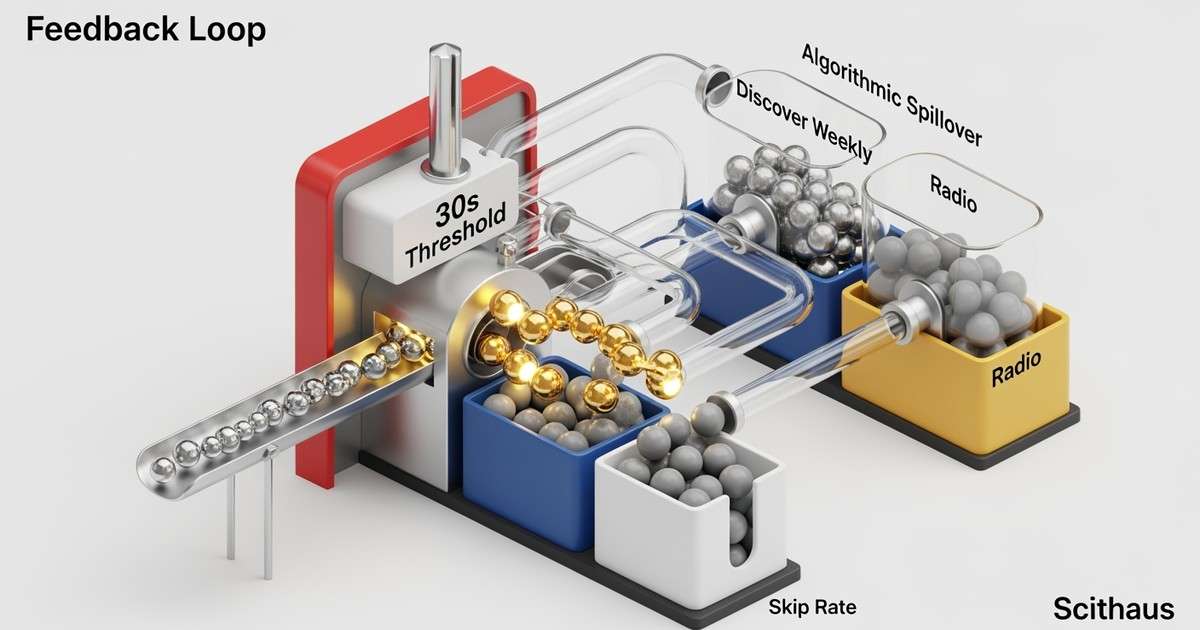
Editorial placement generates data. That data feeds the algorithm. The algorithm decides whether to amplify or suppress.
The positive loop works like this: editorial placement exposes your track to new listeners, who stream through, save, and add to their own playlists. The algorithm sees this positive engagement and recommends your track to Discover Weekly, Radio, and personalized Mixes. More listeners discover you, generating more positive data, and the cycle continues.
The negative loop is the opposite: editorial placement exposes your track to the wrong audience. Listeners skip within 10 seconds. The algorithm interprets this as negative engagement and deprioritizes your track in recommendations. Your algorithmic reach decreases, and the track stalls despite the editorial add.
This is why a "bad" playlist placement can hurt you. Being added to a playlist where your music doesn't fit generates skip data that tanks algorithmic potential.
Reading Your Dashboard
After placement, monitor Spotify for Artists obsessively for 72 hours.
Key Metrics to Watch
| Tab | What to Monitor | What It Tells You |
|---|---|---|
| Streams | Daily stream counts, baseline comparison | Editorial adds typically spike immediately; 10x jump is normal for significant playlists |
| Audience | New vs returning listeners, follow-to-listen ratio | Editorial should drive new listeners; track whether they're converting to followers |
| Playlists | Which playlist added you, your position, estimated streams | Higher position = more exposure; playlist attribution shows direct impact |
Warning Signs
Watch for these patterns within 48 hours. Stream spike but zero new followers means listeners aren't converting. High skip rate visible in song-level analytics indicates wrong audience fit. Streams but no saves suggests passive listening without fan development.
These aren't failures, but they signal the placement isn't converting to sustainable growth.
Maximizing the Window
You have a limited time while you're on the playlist. Use it strategically.
Drive External Traffic
Use the editorial placement as social proof to drive additional traffic from your owned channels. Post playlist screenshots across social platforms, email your list announcing the placement, run a small ad campaign targeting the playlist's audience demographic, and update your Spotify Canvas if you haven't already.
External traffic layered on editorial exposure compounds the algorithmic signal.
Convert Listeners to Followers
Editorial listeners are temporary. Followers are permanent. Encourage follows through your Spotify artist bio with a clear call to action, social posts directing people to follow (not just stream), Canvas video with follow prompts, and cross-promotion with artists on the same playlist.
Every follower you gain during the editorial window will receive your future releases in Release Radar.
Prepare Your Catalog
New listeners who discover you via playlist will check your catalog. Make sure all tracks have complete metadata, your bio is current, Artist Pick highlights your best work, Canvas videos exist on key tracks, and your merch link is active if applicable.
A listener who discovers one song and finds a polished catalog is more likely to become a fan.
Save-to-Stream Conversion and What Each Stream Is Worth
Understanding the relationship between saves, streams, and revenue helps you evaluate whether a placement is building real value or just inflating vanity numbers.
Save Rate Benchmarks
Industry data suggests these benchmarks for editorial playlist placements:
| Metric | Weak Placement | Average Placement | Strong Placement |
|---|---|---|---|
| Save rate | <1% | 3-5% | 7%+ |
| Completion rate | <50% | 65-75% | 80%+ |
| Follow conversion | <0.5% | 1-2% | 3%+ |
A placement with a 5% save rate on 20,000 streams means 1,000 new library saves. Each save represents a listener who will encounter your track again through their own library, increasing the lifetime stream count for that song.
Per-Stream Revenue Across Platforms
Not all streams pay equally. The platform where listeners find you after a Spotify editorial placement directly affects your earnings:
| Platform | Revenue per 1,000 streams |
|---|---|
| Spotify | $3.02 |
| Apple Music | $5.43 |
| YouTube Music | $5.28 |
| Amazon Music | $9.02 |
A placement that generates 20,000 Spotify streams earns $60.40 in Spotify royalties. But if even 10% of those listeners search for you on Apple Music or Amazon Music, the per-stream value of that cross-platform discovery is 1.8x to 3x higher. Artists who distribute broadly capture revenue at every price point.
Why Saves Matter More Than Raw Stream Count
A save is worth far more than a single stream. Saved tracks get replayed from the listener's library for months or years, generating ongoing royalty revenue at the same per-stream rate. One thousand saves today can produce 5,000-10,000 additional streams over the following year, each paying the full $3.02/1K on Spotify. This is why a 20,000-stream placement with a 5% save rate is more valuable than a 40,000-stream placement with a 0.5% save rate.
Playlist Position Matters
Where you sit on a playlist affects your exposure dramatically.
Top 10
Tracks in the top 10 positions get disproportionate streams. Many listeners start playlists from the top or never scroll past the fold.
Middle of Pack
Position 20-50 receives moderate exposure. Listeners who shuffle or scroll will find you, but you're not featured.
Bottom Third
Lower positions get minimal organic exposure. You're technically on the playlist but realistically invisible to most listeners.
Position Changes
Your position typically drops over time as new tracks are added. Position moving down is normal rotation. Position moving up signals strong performance that editors are noticing. Removal means rotation is complete or performance was poor.
The Algorithmic Spillover
The real value of editorial placement isn't the playlist streams themselves. It's triggering algorithmic recommendations.
What Gets Triggered
Strong performance on editorial playlists can trigger:
Discover Weekly: The algorithm may add your track to listeners' personalized Discover Weekly based on similar tastes to playlist listeners.
Radio: Your track gets added to Radio stations for artists with similar profiles.
Personalized Mixes: Daily Mixes, genre mixes, and mood mixes may include your track.
Autoplay: After similar tracks finish, your song may autoplay.
The Threshold Question
Artists often ask: "How many streams do I need to trigger algorithmic?" There's no public threshold. Spotify doesn't disclose the exact mechanics.
What we know from patterns: quality of engagement matters more than raw numbers. Roughly 2,500 streams with 250+ saves in the first 1-3 weeks often correlates with broader algorithmic push. Consistent saves and low skips matter more than total streams. Geographic clustering can trigger regional recommendations.
Monitoring Algorithmic Traction
In Spotify for Artists, check where your streams are coming from. A high percentage from "Listener's own playlists" means fans are saving your music. Growth in "Discover Weekly" streams indicates algorithmic pickup. Radio streams appearing signals the recommendation engine is engaged.
If you're 72 hours post-placement and seeing zero algorithmic attribution, the editorial add didn't create enough positive signal to trigger recommendations.
How Long Will You Stay On?
Editorial playlist tenure varies by playlist type.
| Playlist Type | Typical Duration |
|---|---|
| New Music Friday | 1 week |
| Genre-specific (RapCaviar, Lorem) | 2-4 weeks |
| Mood playlists (Chill Hits, Deep Focus) | 4+ weeks if metrics hold |
| Algorithmic (Release Radar) | Up to 28 days |
High-performing tracks stay longer. Poor performers get rotated out faster.
After Removal
When you're removed from an editorial playlist, expect stream volume to drop, often dramatically. Your daily listener count decreases and the "editorial boost" period ends. This is normal, not a crisis.
The lasting effects are what matter. New followers remain and will see your future releases in Release Radar. Algorithmic recommendations may continue if engagement was strong during placement. Your track's "popularity score" reflects the peak exposure and doesn't reset.
What to do: Analyze which listeners converted to followers. Note what worked for future releases. Don't panic about the stream drop. Focus on the next release, applying what you learned.