
What Changed in 2026
Apple made several significant updates to Apple Music for Artists and the broader platform. These changes affect how you plan promotion and measure results.
iOS 26 features for artists. With Apple's shift to year-based versioning, iOS 26 introduced new music features. Artists can now make lyrics eligible for translation and pronunciation on Apple Music. Set Lists created in Apple Music for Artists now display on concert event pages in the Photos app, creating a new bridge between live shows and catalog listening. AutoMix, which creates seamless transitions between songs, is now on by default.
New LA studio hub. In June 2026, Apple unveiled a 15,000+ square foot studio facility in Los Angeles dedicated to artist-driven content and Spatial Audio. The LA hub joins existing creative spaces in New York, Tokyo, Berlin, Paris, and Nashville. For artists, this signals Apple's continued investment in premium audio experiences and editorial programming.
Enhanced Replay metrics. Apple Music for Artists now includes year-over-year performance summaries, listenership growth tracking, and more shareable social assets. The new metrics make it easier to demonstrate momentum to labels, managers, and collaborators.
Spatial Audio expansion and royalty incentive. Apple continues to push Dolby Atmos mixes as a differentiator. In 2024, Apple confirmed a policy paying up to 10% higher royalties for tracks available in Spatial Audio, regardless of whether the user listens to the Spatial version. This incentive applies globally and signals Apple's strategic commitment to immersive audio.
For artists and labels, Spatial Audio offers two advantages. First, the royalty premium directly improves per-stream economics. Second, tracks delivered in Spatial Audio receive preferential treatment in certain editorial contexts and surface in dedicated Spatial Audio playlists. If you have the budget and creative alignment for an Atmos mix, it can be a meaningful signal to Apple's editorial team and a structural advantage in the catalog.
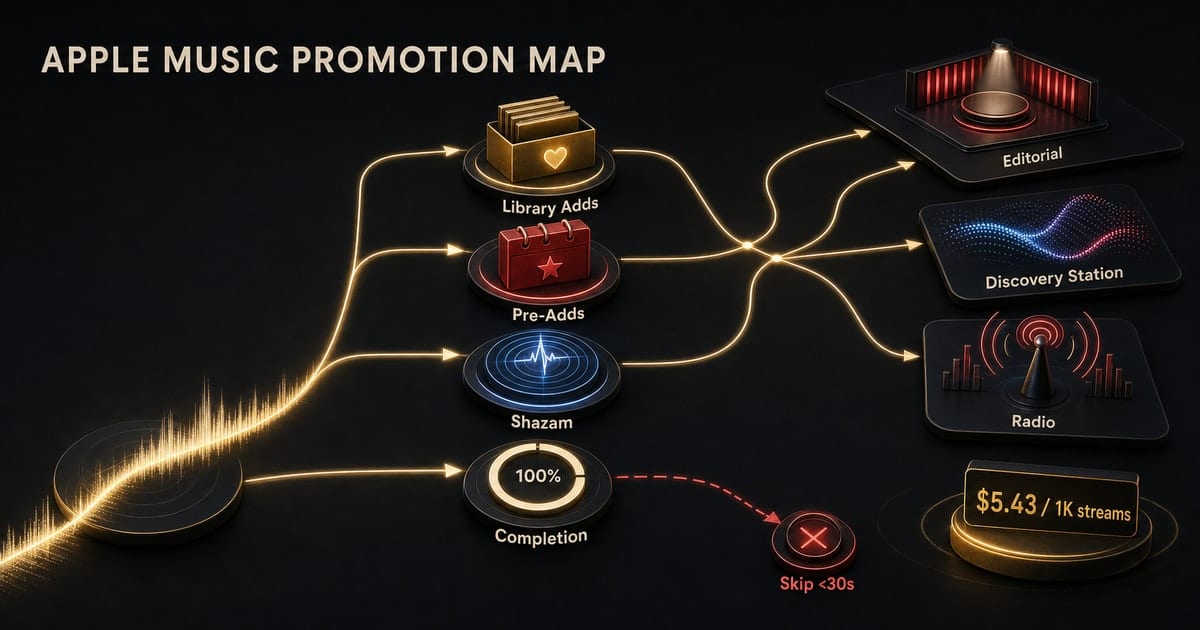
The Apple Music Discovery Map (What You Are Actually Trying to Influence)
Apple has multiple discovery surfaces, and they do different jobs.
| Surface | Type | What it does | Operator focus |
|---|---|---|---|
| Editorial playlists | Curated | High-burst exposure with identity framing | Make placement "stick" via listener behavior |
| Algorithmic mixes | Personalized | New Music Mix, Favorites Mix, taste expansion |
Earn repeat listening from the right pockets |
Discovery Station |
Algorithmic | Continuous testing across taste clusters | Create session-extending behavior |
| Apple Music Radio | Curated shows | Genre-specific discovery, live programming | Profile and catalog readiness |
| Shazam | Intent signal | Organic curiosity indicator | Track as leading indicator of momentum |
Editorial playlists
Editorial playlists are still the highest-impact moment for instant scale. On Apple, editorial placement also carries "identity value" - it frames what kind of artist Apple thinks you are, which matters when fans explore your artist page and catalog.
Algorithmic mixes and stations
Apple has algorithmic playlists and algorithmic stations (for example Discovery Station). These surfaces behave like "taste expansion" tools. If a listener plays your track, saves it to a playlist, or repeats it, Apple has more reasons to test you against adjacent taste clusters.
Apple Music Radio and shows
Radio is not just a nostalgia feature. It is a curated layer with real discovery power, especially for genre scenes where radio-style listening still dominates.
Apple operates three flagship live stations: Apple Music 1 (global pop and culture), Apple Music Hits (2000s-2020s catalog), and Apple Music Country. Beyond these, Apple tracks spins across 40,000+ terrestrial and digital radio stations globally, surfacing this data in Apple Music for Artists.
For promotion strategy, Radio matters in two ways. First, a spin on Apple Music 1 or a genre show can introduce your track to listeners who then explore your catalog. Second, strong Radio Spins data in Apple Music for Artists signals momentum that can support playlist pitches and label conversations.
Shazam as a leading indicator
Shazam sits in Apple's product suite and serves as one of the cleanest "organic curiosity" signals. When someone Shazams your track, they heard it in context (a bar, a store, a friend's car, a social video) and did extra work to identify it. That is high-intent discovery that you did not pay for.
Track Shazam counts in Apple Music for Artists alongside Plays and Saves. A spike in Shazams without a corresponding spike in Plays often means your track is circulating in the real world but listeners are not yet converting to streaming. That is a signal to double down on discovery creative that bridges the gap.
Shazam data also surfaces geographic patterns. If you see Shazam spikes in a specific city or country, that is a signal to target paid media there, or to prioritize local press and playlist outreach.
If you want the short mental model: Apple Music promotion is about earning repeat listeners and library adds from the right audience pockets, then letting Apple's discovery surfaces test you wider.
Regional Strategy: Where Apple Music Matters Most
Apple Music's market share varies significantly by geography. Your DSP priority should reflect where your audience actually listens.
| Region | Apple Music Position | Strategic Implication |
|---|---|---|
| United States | ~25-32% market share, competitive with Spotify | Treat Apple as equal priority; strong for hip-hop, pop, country |
| Japan | Strong due to Apple brand strength | Lead with Apple for Japanese releases |
| Western Europe | Present but behind Spotify | Secondary priority unless audience data says otherwise |
| Latin America | Smaller share; Spotify dominates | Lead with Spotify; Apple as secondary |
| Brazil & Mexico | 3.9M and 3.2M subscribers respectively | Growing market; worth including in multi-DSP strategy |
Premium adoption rates matter too. North America leads with ~59% of users on paid plans. In Asia-Pacific, only ~38% are premium subscribers. Apple Music has no free tier, so every listener is a paying subscriber. This changes the economics: an Apple Music stream from the US market is worth more than a free-tier stream on other platforms.
Genre patterns on Apple. Apple Music over-indexes in certain genres relative to overall market share. Hip-hop, R&B, and pop perform strongly, especially in the US. Country has growing presence for established acts. Electronic and dance music skews toward Spotify and SoundCloud.
Match your DSP priority to your audience. If your analytics show existing listeners skew Apple-heavy (check Apple Music for Artists for geographic and demographic data), lead with Apple. If they skew Spotify, lead there. Do not default to "Spotify first" without checking.
Apple Music for Artists: Setup That Changes Outcomes
Treat Apple Music for Artists as your control panel. Two setup mistakes show up constantly:
- Artist pages that look half claimed, with weak imagery and missing context.
- Release workflows that ignore
pre-adds, lyrics timing, and profile surfaces that Apple uses to tell the story of the artist.
The goal is simple: remove friction for editorial teams, and remove confusion for fans who land on your page after discovery.
Pre-Adds: Apple's Version of "Save Intent"
Apple calls them pre-adds. They serve a similar strategic role to Spotify pre-saves, but the product behavior is different.
Use pre-adds for two reasons:
- to lock in day-one library behavior from warm fans
- to create a clean "intent moment" you can measure and retarget in paid funnels
The pre-add guide in this hub covers what pre-adds can and cannot do, and how to structure the landing page so pre-adds do not become a dead-end click.
Playlists: What Apple Actually Rewards
Apple playlist growth is not only about "get on playlists." It is about what happens after the placement.
Apple will keep leaning into your track if listeners:
- finish it
- replay it
- add it to library or playlists
- keep listening afterward
Most campaigns fail because they buy cheap clicks, drive cold traffic to the wrong DSP, and then wonder why the platform did not compound it.
Paid Media That Converts to Apple Music
The winning pattern is not complicated:
- Run Reels and short-form discovery that earns
watch_time. - Bridge to a landing page where Apple Music is a first-class destination, not an afterthought.
- Optimize to a measurable intent event (
pre-add, follow, email, save-like action), not raw clicks. - Retarget engaged viewers with a second creative angle and a clearer ask.
Paid media does not "hack" Apple Music. It buys enough qualified discovery for your track to earn the listener behaviors Apple's platform compounds.
The Signal Hierarchy: What Apple Actually Weights
Apple's recommendation system discriminates between different types of user interactions. Understanding this hierarchy helps you design campaigns that generate the signals Apple rewards most.
| Signal | Type | Algorithmic Weight | What It Tells Apple |
|---|---|---|---|
| Library Add | Active | Highest | User wants permanent access; strongest affinity signal |
| Favorite (Star) | Active | Very High | Explicit preference; boosts artist visibility across surfaces |
| Playlist Add | Active | High | Provides contextual data (workout, focus, mood) |
| Completion | Passive | Medium | User engaged through the track; validates recommendation |
| Shazam | External | High (Viral) | Organic discovery intent; leading indicator |
| Skip (<30s) | Passive | Negative | Deprioritizes track and similar songs |
| "Suggest Less" | Active | Negative | Hard filter against track or artist |
Library adds are the single most important signal. Unlike a save on other platforms, an Apple Music library add is architecturally equivalent to "ownership" - a vestige of the iTunes model. It signals desire for long-term retention and heavily influences New Music Mix and Discovery Station recommendations.
Completion rate matters more than play count. A track that gets started but skipped before 30 seconds sends a negative signal. Ten completed listens from qualified fans beat 100 half-listens from cold traffic.
The Favorite (star) button is underused. When a user marks a track as a Favorite, it ensures the track appears in their Favorites Mix, boosts the artist's visibility in personalized zones, and biases Autoplay selections. Encourage fans to use it.
Per-Stream Revenue: Why Apple Music Promotion Pays More
The revenue gap between platforms is not marginal. Based on Dynamoi's first-party royalty data, here is what 1,000 streams actually earns across major DSPs:
| Platform | Revenue per 1K streams | vs. Apple Music |
|---|---|---|
| Amazon Music Unlimited | $9.02 | +66% |
| TIDAL | $6.20 | +14% |
| Apple Music | $5.43 | baseline |
| YouTube Music | $5.28 | -3% |
| Spotify | $3.02 | -44% |
What this means for campaign economics: If you spend $500 on a campaign that generates 1,000 saves across platforms, and each save produces 15 streams over 90 days, here is the revenue difference:
- 15,000 Spotify streams: $45.30
- 15,000 Apple Music streams: $81.45
- Difference per campaign: $36.15 more from Apple Music, from the same ad spend
Over 12 months of consistent promotion, that gap compounds significantly. The Spatial Audio royalty bonus (up to 10% premium) further improves Apple Music economics for artists who deliver Atmos mixes.
Strategic implication: For US-focused releases, hip-hop, R&B, and pop in particular, Apple Music deserves first-class treatment in your smart link hierarchy, not a secondary button below Spotify. The per-stream premium justifies routing your highest-intent listeners to Apple Music first.
What To Track (So You Do Not Lie to Yourself)
Track three layers:
| Layer | Metrics | Why it matters |
|---|---|---|
| Attention | watch_time, completion rate, cost per view |
Shows if creative is earning real engagement |
| Intent | pre-adds, follows, email/SMS opt-ins, click quality |
Measures commitment before streaming |
| Downstream | Plays, Average Daily Listeners, Shazams, Radio Spins, catalog lift |
Shows if promotion translates to platform growth |
If you only track clicks, you will scale the wrong thing.
The Personalized Mixes: How Apple Segments Discovery
Apple uses different algorithmic mixes for different discovery modes. Understanding when each updates helps you time your campaigns.
| Mix | Update Frequency | Selection Logic | Your Focus |
|---|---|---|---|
| Heavy Rotation Mix | Daily | Top 25 songs from last 30 days | Reflects current obsessions; validate new releases are landing |
| Favorites Mix | Weekly (Tuesdays) | Deep historical data + explicit Favorites | Long-term catalog engagement |
| New Music Mix | Weekly (Fridays) | New releases from followed artists + similar artists | Release timing matters; Friday drops align with refresh |
| Get Up! / Chill Mixes | Weekly | Acoustic and lyric analysis for energy/mood | Genre and mood positioning affects placement |
New Music Mix timing matters. This mix selects releases from the last 4 weeks. Drops on Fridays align with the refresh cycle. If your release is gaining traction through week one, it has a better chance of appearing in more New Music Mixes during weeks two through four.
Heavy Rotation Mix is your validation metric. If fans who discovered you through paid media are adding your track to their Heavy Rotation, you are building real listeners, not just clicks.
How Editorial and Algorithm Work Together
Apple operates what industry analysts call an "algo-torial" model. Human curation and algorithmic automation are not separate silos but interactive layers.
Editorial placements train the algorithm. When Apple's editors place a song on a high-profile playlist like Today's Hits or Rap Life, that decision acts as a high-authority signal. The algorithm learns that this track has cultural relevance or quality that might not yet be reflected in raw stream counts. This is how new artists break through the cold-start problem.
Behavioral data validates editorial choices. Once a track is on an editorial playlist, Apple's system watches what listeners do. High completion rates and library adds confirm the editorial bet was correct. Low engagement signals the opposite. Tracks that perform well on editorial placements accumulate the data necessary to trigger algorithmic promotion on surfaces like Discovery Station and New Music Mix.
The pitch tool feeds both layers. Apple Music for Artists provides a pitch tool for upcoming releases. Unlike Spotify's pitch, Apple's is primarily directed at the editorial team. However, the metadata you provide in the pitch (mood, genre, locale) is also ingested by the algorithm to categorize the song correctly before it has streaming data.
The operator takeaway: Editorial is not just a promotional event. It is a data event. A placement that performs well creates a cascade of algorithmic visibility. A placement that underperforms (high skips, low library adds) can limit future algorithmic reach.
Start Here (Suggested reading path)
- How Apple Music discovery works (algorithmic surfaces, radio, and the discovery map).
- Pre-adds: when they matter and how to use them.
- Playlists: what is realistic and what actually moves the needle.
- Statistics and benchmarks: what "normal" looks like and where you should expect variance.