
Analytics
Audience Insights
Review filtered audience acquisition, service and tier mix, countries, anonymous/provider records, pagination, and CSV exports.
Audience Insights shows audience records associated with the artist's eligible Smart Link and streaming-service activity. It is a reporting surface for acquisition patterns, not a contact database.
Open Audience Insights
Go to:
Marketing → Smart Campaigns → Audience
The page can show an introductory state until the artist has audience history.
Status and charts
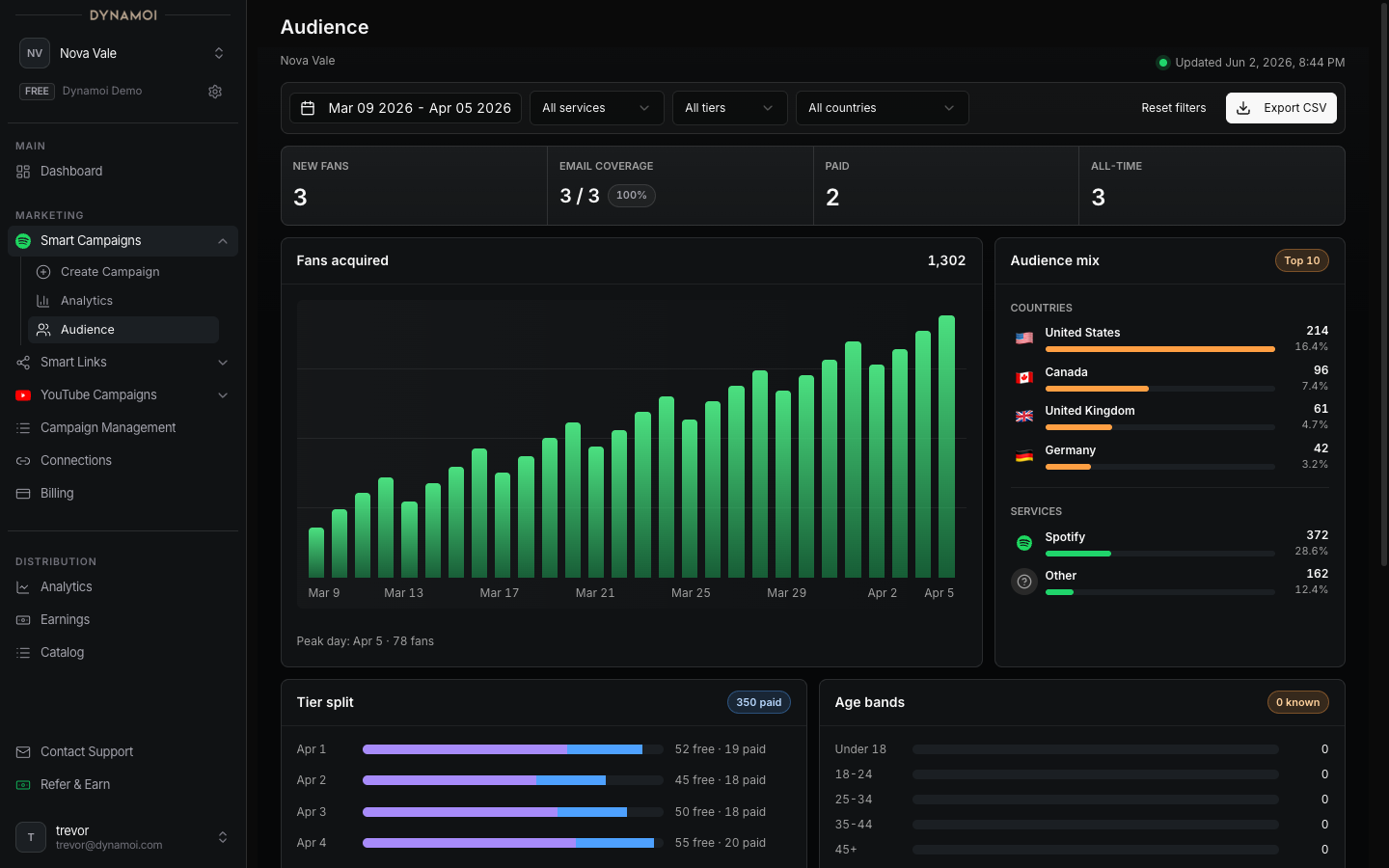
The current page can include:
- New fans in the selected range
- Paid audience records in the selected range
- All-time audience-record count
- Daily acquisition trend and peak day
- Paid-versus-free tier trend
- Top 10 countries with record counts and shares
- Streaming-service mix, including Spotify and Apple Music where represented
Charts respect the active date, service, tier, and country filters.
Filters
| Filter | Current options |
|---|---|
| Date | Last 7 days, Last 28 days, Last 90 days, This Month, Last Month, Maximum, or a custom range |
| Service | All services, Spotify, or Apple Music |
| Tier | All tiers, paid, or free |
| Country | All countries or an available country in the selected range |
Use Reset filters to return to the default Last 28 Days view while preserving the current sort direction and key.
Audience table
Each row exposes only the fields represented by the current audience contract:
- Record type: Provider record or Anonymous provider record
- Streaming service
- Country, when available
- Subscription tier
- Acquisition date
The table supports server-side sorting by date, service, country, or tier and pagination sizes of 10, 25, 50, or 100 rows. Server-side sorting means changing the order applies to the full filtered result, not only the visible page.
Note The current Audience table does not expose fan names, email addresses, or arbitrary provider profile details. Anonymous rows intentionally remain anonymous.
CSV export
Export CSV downloads all rows matching the current filters and sort, not only the visible page. The export fields are:
- Date
- Record type
- Service
- Country
- Tier
The export does not add hidden contact data. When there are no matching rows, export is disabled.
Freshness and empty ranges
The filter bar shows when the page was fetched. A zero-row date range can still coexist with older all-time audience history; in that case the page explains that no fans landed in the selected window.
Choose Maximum to use the earliest and latest audience dates known for the artist. Provider sync delay, missing country, and anonymous identity can produce incomplete fields without making the whole row invalid.
Privacy and use
Treat audience exports as platform data subject to your agreements, privacy obligations, and applicable law. Do not infer an identity from an anonymous row or combine data in a way that defeats provider privacy controls.