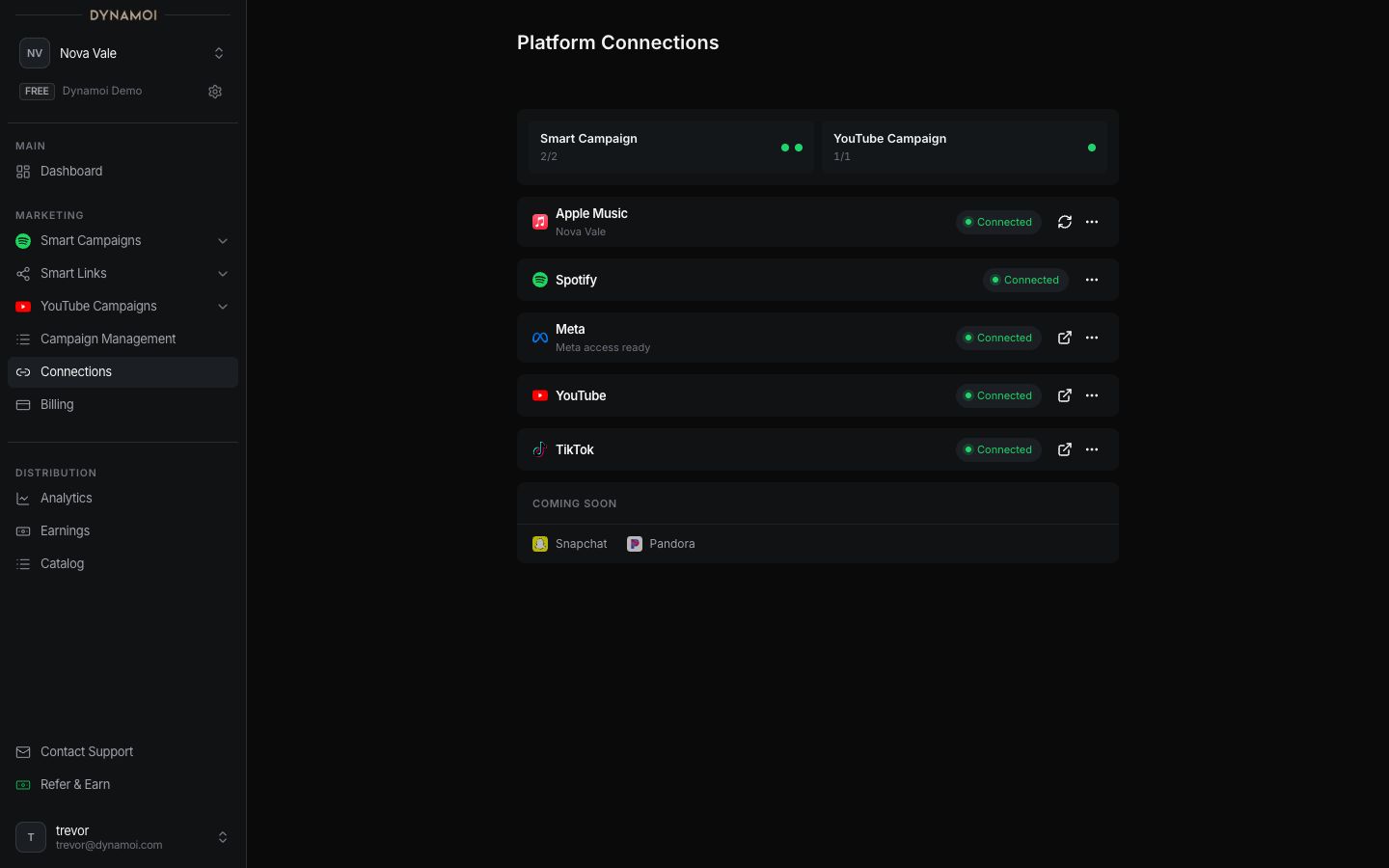
Platform Connections Overview
Understand which platform connections are required for each campaign type and why they matter for accurate targeting and tracking.
Dynamoi integrates with major streaming and advertising platforms to enable campaign deployment and performance tracking. Each connection serves a specific purpose in your marketing workflow.

Platform connections unlock specific capabilities for your campaigns:
| Connection | What It Enables |
|---|---|
| Spotify | Catalog access, ISRC tracking, save/follow measurement |
| Meta | Facebook/Instagram ad deployment, conversion tracking |
| YouTube | Channel linking, view tracking, AdSense revenue optimization |
Campaigns run on Dynamoi's shared ad accounts. Your connections provide content access and tracking rather than ad account credentials.
Different campaign types require different connections:
| Connection | Required | Purpose |
|---|---|---|
| Spotify for Artists | Yes | Access catalog, track saves, verify artist identity |
| Meta (Facebook/Instagram) | Yes | Deploy ads, track conversions on Meta platforms |
| Billing | Yes | Fund campaign spend |
| Connection | Required | Purpose |
|---|---|---|
| YouTube Channel | Yes | Link channel, access video content |
| Google Ads DataLink | Yes | Enable campaign deployment on your channel |
| Billing | Yes | Fund campaign spend |
You can switch between campaign types using the toggle in your dashboard. Complete connections for both types if you plan to run both.
In your dashboard, each connection shows one of these states:
| Status | Meaning | Action Needed |
|---|---|---|
| Connected | Active and ready | None |
| Action Required | Needs attention | Follow the prompt |
| Not Connected | Setup not started | Begin connection flow |
| Expired | Token needs refresh | Re-authorize |
Each platform follows a multi-step connection process:
Grant Dynamoi access to your platform account via OAuth.
Choose which specific account, page, or channel to connect.
Confirm the connection and wait for any required approvals.
Connection is active and campaigns can deploy.
If you manage multiple artists, each artist profile has its own set of connections:
Connections are per-artist, not per-organization. Switching artists in the dashboard shows that artist's specific connections.
Platform connections use OAuth tokens that can expire:
| Platform | Token Lifetime | Renewal |
|---|---|---|
| Spotify | Long-lived | Rarely needs re-auth |
| Meta | 60 days | Re-authorize when prompted |
| YouTube | Long-lived | Rarely needs re-auth |
When a token expires, you'll see an "Action Required" status. Click to re-authorize and restore the connection.
| Issue | Likely Cause | Solution |
|---|---|---|
| "Access Denied" | Insufficient permissions | Ensure you're the admin of the account |
| Wrong account connected | Selected wrong profile | Disconnect and reconnect with correct account |
| Connection keeps failing | Browser cache/cookies | Try incognito window or different browser |
| "Partnership pending" | Meta approval in progress | Wait 24-48 hours for Meta review |
If a connection is not working correctly:
Platform ConnectionsDisconnecting a platform does not delete your campaigns. It pauses deployment until you reconnect.
Dynamoi requests only the permissions necessary for campaign management:
| Platform | Data We Access |
|---|---|
| Spotify | Artist catalog, ISRCs, public metrics |
| Meta | Page identity, posting permissions, ad performance |
| YouTube | Channel identity, video content, analytics |
We never access:
Dynamoi integrates with major streaming and advertising platforms to enable campaign deployment and performance tracking. Each connection serves a specific purpose in your marketing workflow.

Platform connections unlock specific capabilities for your campaigns:
| Connection | What It Enables |
|---|---|
| Spotify | Catalog access, ISRC tracking, save/follow measurement |
| Meta | Facebook/Instagram ad deployment, conversion tracking |
| YouTube | Channel linking, view tracking, AdSense revenue optimization |
Campaigns run on Dynamoi's shared ad accounts. Your connections provide content access and tracking rather than ad account credentials.
Different campaign types require different connections:
| Connection | Required | Purpose |
|---|---|---|
| Spotify for Artists | Yes | Access catalog, track saves, verify artist identity |
| Meta (Facebook/Instagram) | Yes | Deploy ads, track conversions on Meta platforms |
| Billing | Yes | Fund campaign spend |
| Connection | Required | Purpose |
|---|---|---|
| YouTube Channel | Yes | Link channel, access video content |
| Google Ads DataLink | Yes | Enable campaign deployment on your channel |
| Billing | Yes | Fund campaign spend |
You can switch between campaign types using the toggle in your dashboard. Complete connections for both types if you plan to run both.
In your dashboard, each connection shows one of these states:
| Status | Meaning | Action Needed |
|---|---|---|
| Connected | Active and ready | None |
| Action Required | Needs attention | Follow the prompt |
| Not Connected | Setup not started | Begin connection flow |
| Expired | Token needs refresh | Re-authorize |
Each platform follows a multi-step connection process:
Grant Dynamoi access to your platform account via OAuth.
Choose which specific account, page, or channel to connect.
Confirm the connection and wait for any required approvals.
Connection is active and campaigns can deploy.
If you manage multiple artists, each artist profile has its own set of connections:
Connections are per-artist, not per-organization. Switching artists in the dashboard shows that artist's specific connections.
Platform connections use OAuth tokens that can expire:
| Platform | Token Lifetime | Renewal |
|---|---|---|
| Spotify | Long-lived | Rarely needs re-auth |
| Meta | 60 days | Re-authorize when prompted |
| YouTube | Long-lived | Rarely needs re-auth |
When a token expires, you'll see an "Action Required" status. Click to re-authorize and restore the connection.
| Issue | Likely Cause | Solution |
|---|---|---|
| "Access Denied" | Insufficient permissions | Ensure you're the admin of the account |
| Wrong account connected | Selected wrong profile | Disconnect and reconnect with correct account |
| Connection keeps failing | Browser cache/cookies | Try incognito window or different browser |
| "Partnership pending" | Meta approval in progress | Wait 24-48 hours for Meta review |
If a connection is not working correctly:
Platform ConnectionsDisconnecting a platform does not delete your campaigns. It pauses deployment until you reconnect.
Dynamoi requests only the permissions necessary for campaign management:
| Platform | Data We Access |
|---|---|
| Spotify | Artist catalog, ISRCs, public metrics |
| Meta | Page identity, posting permissions, ad performance |
| YouTube | Channel identity, video content, analytics |
We never access: