
Analytics
YouTube Analytics
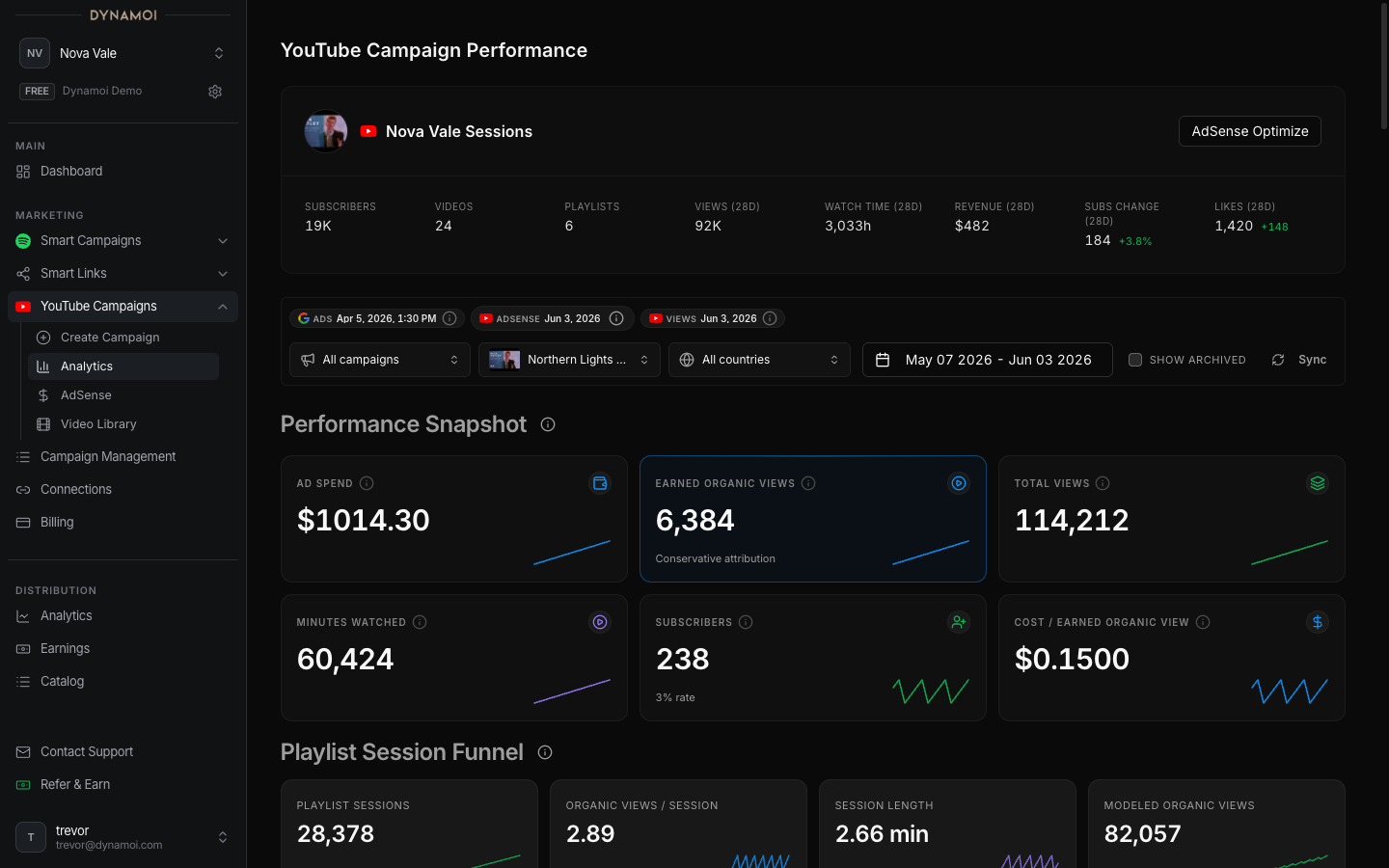
Read Google Ads campaign performance, blended campaign impact, organic YouTube channel results, videos, playlists, countries, and revenue data.
YouTube Analytics separates three reporting layers so paid delivery is not confused with channel-wide organic activity:
- Campaign Performance — Google Ads data
- Campaign Impact — measured combinations of Google Ads and observed YouTube data
- Channel Results — organic YouTube Analytics data from all available channel sources
Filters and availability
Depending on the artist and campaign portfolio, the page can expose:
- Date range
- Campaign filter
- Country filter
- Video filter
- Data-through and freshness notices
- Source and strategy-coverage chips
A connected YouTube channel is required for channel-level panels. Google Ads delivery can still be available for a linked shop campaign even when the page is operating in a delivery-only state.
Campaign Performance
The paid-delivery band is sourced from Google Ads. Its headline metrics adapt to the selected strategy mix and available data.
| Metric | Meaning |
|---|---|
| Impressions | Times Google Ads reports the campaign was shown |
| Ad interactions | Google Ads delivery interactions, combining paid views and clicks according to campaign type |
| Views through the ad | Google Ads clicks from the ad to the YouTube watch page; follow-on organic views are reported separately |
| Organic views | Google Ads converted-view signal for people reported to continue watching the channel after the ad |
| Cost per organic view | Spend divided by that converted-view signal |
| Subscribers | Google Ads-reported subscriber conversions when available |
| Cost per subscriber | Spend divided by reported subscribers |
| CPM / cost per interaction | Standard Google Ads delivery-efficiency calculations |
“Organic views” on this band is a Google Ads conversion field, not the same as every organic channel view reported by YouTube Analytics.
The band can also show paid-delivery trends and country rows for ad views, converted organic views, cost per ad view, and cost per converted organic view.
Campaign Impact
This band appears when the two sources can be aligned for the selected window. Conditional panels can include:
- Paid clicks beside observed channel response during the paid window
- Watch-time efficiency per advertising dollar
- Video-bench comparisons across promoted content
- Strategy coverage and source-provenance notes
These are measured comparisons, not causal guarantees. YouTube channel activity can be influenced by organic publishing, existing audience, other advertising, recommendations, external links, and catalog effects.
Channel Results
The channel band uses YouTube Analytics and can include:
- Total channel views in the selected range
- Estimated minutes watched
- Country-level views, watch time, and revenue where available
- Playlist waterfall or follow-on viewing
- Discovery-source mix and trends, including search, suggested/browse, external, and other sources
- Search terms when returned
- Video-level creative-quality comparisons
- Sparse-history states when the channel does not have enough active days for full charts
These are channel-wide results for the selected scope, not automatically campaign-attributed results.
Revenue and monetization
For monetized channels with usable data, the page can show:
- Estimated YouTube revenue
- RPM
- Revenue per view
- Attributed revenue estimate
- Attributed return multiple
- Total channel return multiple
AdSense can lag behind Google Ads. Dynamoi limits revenue calculations to the latest usable AdSense date and displays a data-through notice. See AdSense ROI for formulas and cautions.
Shop-linked campaigns
A shop-only buyer sees a simplified analytics surface focused on order status, delivery timeline, delivered views, impressions, and country cost-per-view reporting. After a shop campaign is linked to an artist account, it remains analytics-only; dashboard lifecycle and edit controls are unavailable.
Provisional and delayed data
The current Google Ads day can be marked provisional because conversion fields are incomplete. YouTube Analytics and AdSense can arrive even later. Before comparing sources:
- Align the date windows
- Read each source chip
- Check whether the latest day is provisional
- Check monetization completeness
- Avoid treating missing fields as zero
- Allow the provider time to revise recent data
See Metrics Glossary for definitions and YouTube Campaign Overview for strategy behavior.